Most SaaS Chatbots Are Still Glorified Search Bars
It's 2026 and most SaaS chatbots still work the same way they did in 2019 match a keyword, return a help article, hope the user figures it out.
When someone asks anything slightly outside the FAQ list, the bot responds with: "I didn't understand your question. Please contact support."
That response costs you the user's trust. And probably the user.
The gap between FAQ bots and real AI chatbots isn't incremental. It's architectural. And for SaaS founders evaluating AI chatbot development, understanding that gap is the difference between building something users tolerate and something they prefer over human support.
What you'll learn in this guide
Why FAQ bots fail and what AI chatbots do differently
The 5 capabilities that separate real AI chatbot development for SaaS from keyword matching
Signs your SaaS product actually needs an AI chatbot
How to build one that resolves issues, not just deflects them
Common mistakes that kill AI chatbot projects before they launch
A simple architecture framework any founder can understand
What Makes AI Chatbot Development for SaaS Different From FAQ Bots?
Five architectural differences. Each one changes the user experience fundamentally.
1. Intent Understanding Not Keyword Matching
FAQ bot: Matches "how do I reset my password" to a password reset article. Anything phrased differently returns "I didn't understand."
AI chatbot: Understands that "I can't get into my account," "login is broken," and "forgot my credentials" all mean the same thing and responds appropriately to each.
This semantic understanding comes from LLMs that process language at a meaning level. Real users don't speak in FAQ keywords. They describe problems in their own words, often imprecisely. A chatbot that requires users to guess the right phrasing is a chatbot that frustrates users.
Key takeaway: Intent understanding is the foundation. Without it, every other capability is irrelevant.
2. Multi-Turn Conversation Memory
FAQ bot: Treats every message as independent. No memory of what was said 30 seconds ago.
AI chatbot: Maintains context across the entire conversation. When a user says "what about the premium plan?" after asking about pricing, the AI knows they're comparing it doesn't ask "what do you mean?" from scratch.
For complex workflows, memory is essential. An insurance claims conversation spans 15–20 turns collecting incident details, policy information, and documentation. Losing context midway forces the customer to restart exactly the frustration the chatbot was built to eliminate.
Key takeaway: Multi-turn memory is what makes AI chatbots feel like conversations, not form submissions.
3. Grounded Responses via RAG Not Hallucination
The most dangerous chatbot is one that confidently gives wrong answers.
Generic LLMs hallucinate they generate plausible-sounding responses that are factually incorrect. AI chatbots built with RAG (Retrieval Augmented Generation) retrieve relevant information from your verified knowledge base before generating a response.
In production environments, RAG-grounded chatbots are already handling:
Insurance intake answering policy questions from actual policy documents
Medical documentation generating clinical notes grounded in patient records
Education tutoring students exclusively from uploaded course materials
The strongest RAG implementations refuse to answer when information isn't in the knowledge base. Based on internal benchmarks, well-configured RAG chatbots achieve 99%+ out-of-material decline rates meaning they say "I don't have that information" rather than making something up.
Key takeaway: RAG is the difference between a chatbot users trust and one that creates liability.
4. Task Completion Not Just Information Delivery
FAQ bot: Tells you about the return policy.
AI chatbot: Processes the return.
This is the capability gap most SaaS founders underestimate. AI chatbot development for SaaS isn't just about better answers it's about completing work.
In production, AI chatbots are:
Collecting structured data through multi-turn conversations
Validating information against business rules
Populating CRM and CMS systems automatically
Generating compliance records and documentation
Triggering workflows and notifications
The user leaves the conversation with a resolved issue not a help article to read.
Key takeaway: Measure what the chatbot completes, not what it answers.
5. Intelligent Escalation Knowing When to Stop
The worst chatbot behaviour is pretending it can handle something it can't.
Production AI chatbots escalate based on three signals:
Confidence score the AI's self-assessed certainty drops below threshold
Topic boundary the query falls outside the chatbot's defined domain
User frustration the user explicitly asks for a human or shows dissatisfaction
The escalation includes a structured summary of everything the AI has already collected so the human handler doesn't ask the user to repeat themselves.
In well-built systems, roughly 25–35% of conversations escalate to humans. That's not failure that's the chatbot knowing its limits and routing appropriately.
Key takeaway: Escalation design is as important as resolution design. A chatbot that never escalates is a chatbot that's failing silently.
Signs Your SaaS Product Needs an AI Chatbot
Not every SaaS product needs one. But if any of these sound familiar, it's time to evaluate:
Support tickets are increasing month-over-month and you're considering hiring more agents
Users repeatedly ask the same 20–30 questions that are already in your help docs
Onboarding friction is high users drop off because they can't figure things out fast enough
Ticket resolution time is climbing simple issues take hours instead of minutes
Your support team is overloaded with Tier 1 queries that don't require human judgment
If three or more of these describe your current situation, an AI chatbot will deliver measurable ROI within the first 30 days.
According to Gartner, by 2027, chatbots will become the primary customer service channel for roughly a quarter of organisations. The shift from FAQ bots to AI-powered resolution is already underway.
How to Build an AI Chatbot That Users Actually Prefer
Start With 20 Intents, Not 200
Your chatbot doesn't need to handle every possible query at launch. Identify the top 20 user intents from your support ticket data. Build the chatbot to handle these 20 exceptionally well. For everything else, escalate.
AI chatbot development for SaaS works best when you launch focused and expand based on real usage not guesses.
Train on Your Data, Not the Internet
A chatbot trained on general internet knowledge gives general internet answers. Your users want answers specific to your product, your policies, your documentation.
Build a RAG pipeline that ingests your help docs, knowledge base articles, product documentation, and FAQ content. The chatbot answers from your data not from the internet.
This is the single most important architectural decision for chatbot quality.
Design for Failure Before Success
Users will ask questions your chatbot can't answer. They'll try to break it. They'll use it in ways you didn't anticipate.
Design the failure experience first:
What does the chatbot say when it doesn't know?
How does it escalate to a human?
How does it handle offensive or adversarial input?
How does it recover from a misunderstanding?
What happens after 3 failed attempts to collect information?
The best chatbots handle failure gracefully. The worst ones pretend failure isn't happening.
Measure Resolution, Not Deflection
The wrong metric: "How many queries did the chatbot handle?"
The right metric: "How many queries did the chatbot resolve?"
A chatbot that handles 1,000 queries but resolves 200 is worse than one that handles 500 and resolves 400.
Three metrics that matter:
Resolution rate did the user's problem actually get solved?
CSAT did the user rate the experience positively?
Escalation rate how often did the chatbot need human help?
Key takeaway: Deflection looks good on a dashboard. Resolution is what reduces support costs.
Should You Even Build One?
Honest assessment before you invest:
Build an AI chatbot if:
You have 50+ support tickets/week with repetitive Tier 1 queries
Your help documentation is comprehensive enough to serve as a knowledge base
You can define clear domain boundaries for what the chatbot should and shouldn't handle
You're prepared to invest in ongoing accuracy improvement (not just a launch-and-forget)
Don't build one yet if:
You have fewer than 20 support tickets/week (the ROI isn't there)
Your documentation is incomplete or outdated (garbage in, garbage out)
You expect the chatbot to replace your support team entirely
You're not ready to monitor, refine, and improve post-launch
AI chatbots are an investment in infrastructure, not a quick fix. The return is substantial but only if the foundation is right.
Common Mistakes That Kill AI Chatbot Projects
Avoid these each one has killed real projects:
Training on internet data instead of your own
Your chatbot needs to answer from your data. Internet-trained chatbots give generic responses that don't match your product, your policies, or your terminology.
Trying to automate everything on Day 1
Start with 20 intents. Expand based on real usage. Chatbots that try to do everything at launch do nothing well.
No escalation system
A chatbot without escalation is a chatbot that fails silently. Users get stuck, get frustrated, and leave and you never know it happened.
Ignoring hallucination prevention
Without RAG grounding and confidence thresholds, your chatbot will confidently give wrong answers. In regulated industries, that's not just embarrassing it's a liability.
Measuring deflection instead of resolution
"The chatbot handled 5,000 queries this month" means nothing if 4,000 of those users still contacted support afterward.
AI Chatbot Architecture: A Simple Framework
For founders who want to understand how it works without reading an engineering spec:
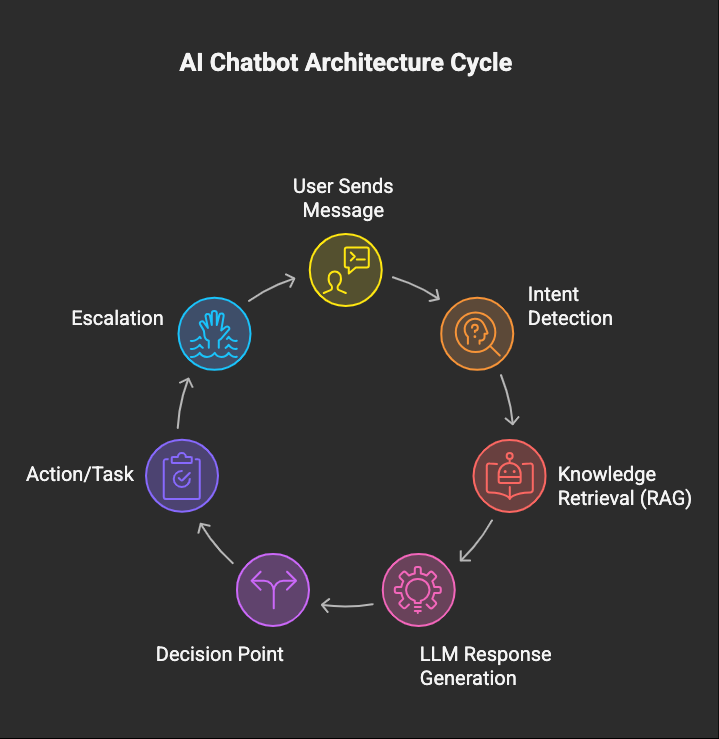
Every production AI chatbot follows this flow. The engineering is in making each step reliable, accurate, and fast at scale.
The Technology Decisions That Matter
LLM Selection
Not all LLMs are equal for chatbot use cases.
Claude Sonnet superior instruction-following. Ideal for chatbots with strict compliance requirements. Reliably generates FCA-compliant, HIPAA-safe language without extensive post-processing.
GPT-4o stronger reasoning. Better for chatbots processing complex medical, technical, or financial content.
Gemini strong multimodal capabilities. Best when chatbots need to process images and documents alongside text.
The choice should be driven by your chatbot's specific requirements not brand preference.
Streaming Non-Negotiable for UX
Users expect real-time response rendering text appearing word-by-word, not a 10-second wait followed by a wall of text.
Server-Sent Events or WebSocket streaming with typing indicators during processing reduces perceived latency by 60–70% (based on internal A/B testing across multiple deployments). This single UX decision transforms the chatbot from feeling sluggish to feeling conversational.
Conversation Memory Across Sessions, Not Just Within Them
Users expect the chatbot to remember what they discussed yesterday. Per-user conversation history with configurable retention periods ensures continuity across sessions so users never have to re-explain their situation.
Multi-Channel Deployment
Build the conversation engine once. Deploy across web chat, mobile, WhatsApp (Meta Business API), and voice (Twilio + Whisper). The underlying AI is shared only the interface adapter changes per channel.
What Real AI Chatbots Look Like in Production
Not theoretical capabilities actual production systems:
Insurance claims intake AI chatbot handling First Notice of Loss across 14 claim types. 24/7 operation on web and voice. Based on internal benchmarks: 78% faster FNOL processing, 94% CMS auto-population accuracy, 69% of standard claims fully automated by AI. FCA-compliant communication records generated automatically.
Clinical documentation ambient AI listening to doctor-patient conversations and generating structured SOAP notes. Arabic-English bilingual transcription. Based on internal benchmarks: 82% documentation time reduction, 91% bilingual accuracy, 87% EMR auto-population.
University tutoring RAG-powered chatbot across 7 US universities answering exclusively from course materials. Based on internal benchmarks: 100% citation rate, 99.3% out-of-material decline rate, 4.5/5 student satisfaction.
These systems demonstrate what's possible when AI chatbot development for SaaS is approached as a serious engineering discipline not a weekend wrapper around ChatGPT.
Frequently Asked Questions About AI Chatbot Development for SaaS
Which LLM should I choose GPT-4o or Claude?
GPT-4o (OpenAI) for complex reasoning and content-heavy chatbots. Claude Sonnet (Anthropic) for compliance-sensitive applications with strict output requirements. Gemini (Google) for multimodal capabilities. The right choice depends on your domain, compliance needs, and accuracy requirements not the model's marketing.
Do AI chatbots replace support teams?
No. They augment them. AI chatbots handle Tier 1 queries repetitive, routine, well-documented. Human agents handle Tier 2 and Tier 3 complex, emotional, judgment-dependent. Typical result: 40–70% reduction in Tier 1 ticket volume, freeing your support team to focus on issues that actually need a human.
How much training data do I need?
For RAG-based chatbots, start with your existing documentation help articles, FAQs, product docs, policy pages. 50–100 documents covering the top 20 user intents is enough to launch. Expand based on what users actually ask about. You don't need thousands of labelled examples unless you're fine-tuning which most SaaS chatbots don't need.
Can AI chatbots integrate with CRMs and ticketing systems?
Yes. Production AI chatbots integrate with Salesforce, HubSpot, Zendesk, Intercom, Guidewire, and custom CMS platforms. The chatbot collects information through conversation, validates it, and pushes structured data to your existing systems via API. Based on internal benchmarks, well-integrated chatbots achieve 90%+ auto-population accuracy in CMS fields.
Can I start with a simple chatbot and upgrade to AI later?
Yes, but design the architecture for AI from Day 1. Starting with a rule-based chatbot and migrating to AI later typically costs 50–70% of building AI from scratch because the conversation flows, data models, and escalation logic need complete redesign. It's cheaper to build AI-ready from the start.
How long until the chatbot reduces support tickets?
Measurable impact within 30 days. Typical result: 30–50% reduction in Tier 1 tickets in the first month, growing to 50–70% by Month 3 as the knowledge base expands and the AI improves from user feedback.
The Bottom Line
The SaaS chatbot market in 2026 is split between two realities: products that deployed FAQ bots and call them "AI," and products that built real AI chatbots that understand, reason, complete tasks, and know when to ask for help.
The first category frustrates users. The second category reduces support costs, improves resolution times, and creates an experience users genuinely prefer.
The difference isn't budget. It's architecture. FAQ bots and AI chatbots cost similar amounts to build. But one resolves issues. The other creates new ones.
“If your chatbot's most common response is "Please contact support," it isn't a solution. It's an obstacle with a friendly interface.”
Thinking about building an AI chatbot for your SaaS product? The first decision isn't which LLM to use it's whether you need a support assistant, an onboarding chatbot, a workflow automation system, or a full conversational AI platform. Each requires a different architecture, different scope, and different investment.
Book a Chatbot Strategy Session → We'll help you figure out which approach fits your product, your users, and your budget.